🎮 Time travel with retro games – discover the ClassicGameZone collection!
If you love the history of video games, or just want to get nostalgic with a classic game, there's a really special website I have to show everyone: ClassicGameZone. Here you won't just find a few nostalgic pieces, but from the very beginning of games (the '70s) to today, organised by year and sorted by console/platform, you can browse hundreds of classics – and play them for free in your browser.
🔗www.classicgamezone.com/yearly-games
What can you find on ClassicGameZone's „Yearly Games" page?
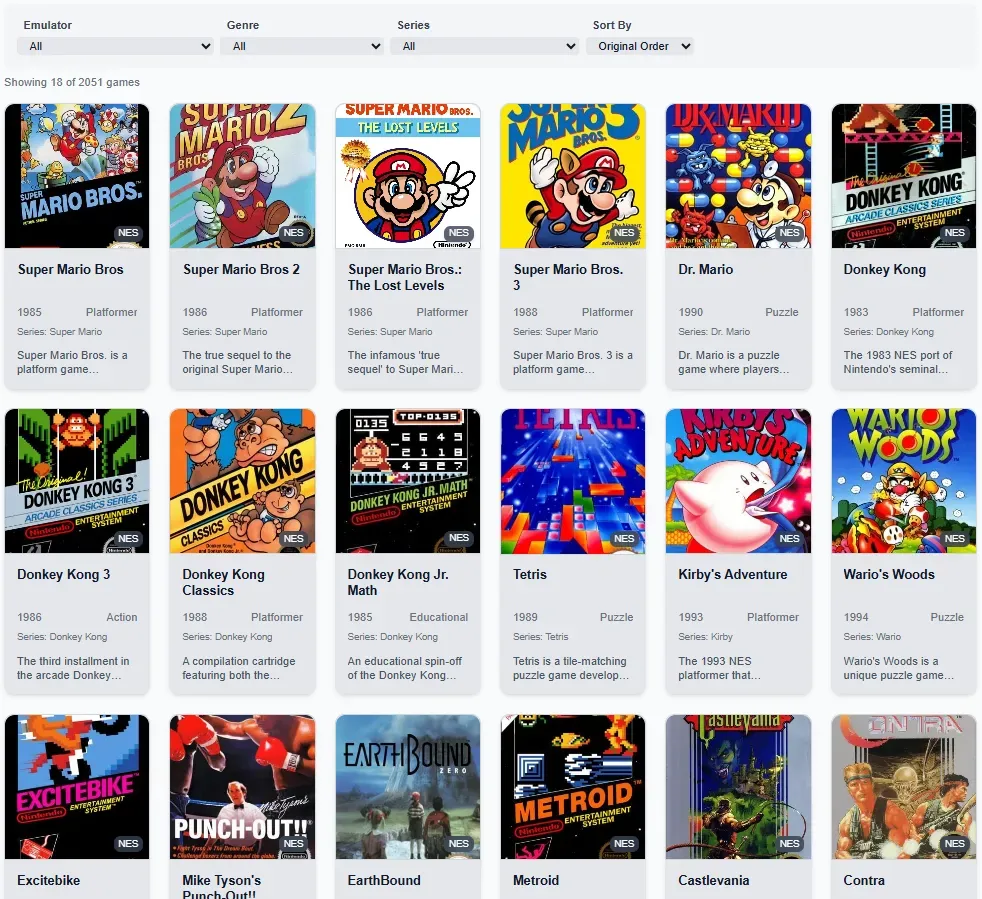
The point of the page is that it arranges retro video games by release year, and you can also filter by console type, platform or genre. Classic Game Zone
Some key features:
- The left-hand menu lists the main consoles/platforms, such as Nintendo Entertainment System (NES), Super Nintendo (SNES), Sega Master System, Sega Genesis / Mega Drive, Game Boy, Neo Geo, Atari, PlayStation, and many more.
- Each game has a „Play" button, so one click and you're playing right in your browser – no download needed. Classic Game Zone
- Each game also has a short description: genre, series, and the game's significance or interesting facts.
- Under „Explore Games by Release Year" you can see the site starts as early as the 1970s (e.g. 1978 – Space Invaders) and moves forward year by year, with more and more platforms and games. Classic Game Zone
- There's also a „View All Games" option to see every game released in a given year. Classic Game Zone
And of course Prince of Persia, which just turned 36, is there too:
https://classicgamezone.com/prince of persia
Overall, the website is extremely clear, well organised and easy to navigate. If you're looking for a particular year, platform or genre, you can easily filter for it.