How can a password be cracked?
As people's online presence grows day by day, the security of our personal data and passwords becomes ever more important. Unfortunately, we hear more and more often about hacked databases, leaks of confidential data or passwords (or password hashes), and cracked email passwords.
Fortunately, all self-respecting providers now store passwords as hashes, which are much harder to link to real passwords than plain text would be. Even so, it's particularly important that our password is strong, because only then can it protect us and reduce the chance of it being cracked.
To understand how important a strong password is, and what exactly makes a password strong, it's worth looking at the most common ways passwords are cracked.
Bruteforce
One of the most basic and therefore usually least effective ways to crack passwords is so-called brute force. This method tries every possible combination of characters one by one. Looking only at the letters of the English alphabet, that's 26 options per character, so a six-character password made only of English letters means 308,915,776 possible passwords in total. Though this number may seem big at first, an average computer today would crack the password this way in about 8 milliseconds. An eight-character password of the same kind can be cracked in 5 seconds. If it also contains a number, the time rises to 1 minute for eight characters. With punctuation, it's 19 minutes, and with accented characters it jumps to 2 months. Each additional character increases security exponentially, so cracking a 9-character password with accented letters, punctuation and numbers would take an average computer 21 years. And if the same password also uses capital letters, brute-forcing it takes 94 years. (The statistics mentioned here come from the https://www.security.org/how-secure-is-my-password/)
So if we want to defend against this method, we can say that the longer the password and the more types of characters it uses, the safer it is. For a 10-character password with upper- and lower-case letters, numbers, accented letters and punctuation, we can safely say that brute force isn't worth it with today's technology.
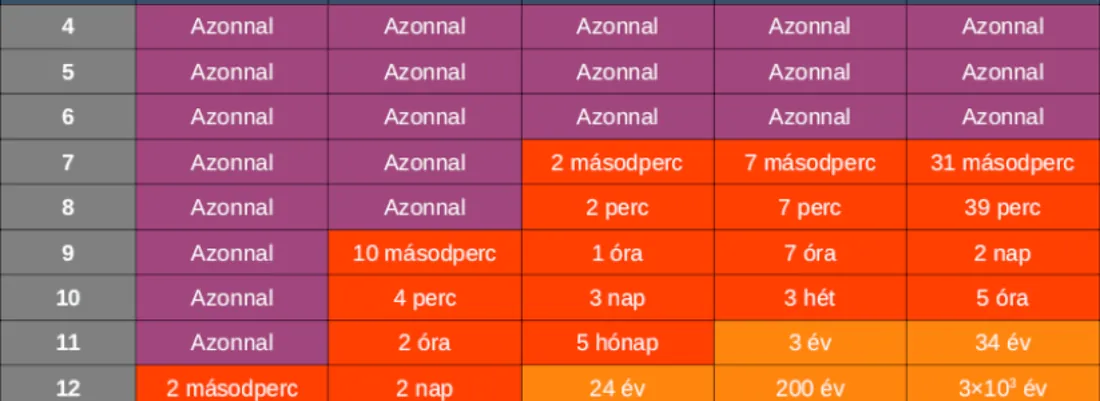
How long does it take a hacker to crack your password?
As the two images show, technology has advanced a lot in 2 years: an 8-character password of only numbers and lower-case letters, which in 2022 could be cracked in 2 minutes on an average computer, can now be cracked 100 times faster thanks to advances in artificial intelligence.
Dictionary attack
Brute force is really only useful for passwords that are considered particularly weak. But if we think about it more, we don't need to try every possible combination – only those people would actually use as passwords. This is where the dictionary attack comes in. A password is easy to remember if we can link it to something, if it has meaning, and most people choose their passwords this way. So if we narrow the possible passwords down to meaningful English and Hungarian words in upper and lower case, the number is still much smaller than the three hundred million mentioned above, and trying them all takes barely a fraction of a second. All the attacker needs is a suitable „dictionary", and they can crack our password in moments.
So how can you defend against a dictionary attack? Use punctuation and numbers too, and using several words also makes the attacker's job harder. Best of all is not to use a meaningful word as a password at all, though understandably that means passwords that are hard to remember. Password managers can help – more about them at the end of the article.
Cracked password databases
It's worth mentioning leaked and cracked password databases, which are currently having their heyday. As mentioned at the start of this article, most providers store passwords as hashes, so they can't simply be reversed; but if the password has been used elsewhere, or we registered with a less careful provider, our password may have leaked too.
Ideally, the provider should then notify us of the incident and ask us to change our password. Unfortunately, not every provider is so careful, but luckily there are other ways to find out whether one of our email addresses was involved in an earlier incident, for example on the following site:
And what can we do to avoid problems caused by cracked password databases? Use a different password on every site, and if you learn of a leak, change any passwords that may be affected.
Social hacking
Social hacking, also known as social engineering, is the method where the break-in doesn't happen on the system side. It's almost a cliché that people are the weakest link in any system, but that doesn't make it any less true. Attackers mainly rely on goodwill and gullibility, usually pretending to be someone else to obtain a password or access. For example, at a larger company someone may pose as a system administrator over the phone and ask for your password, or try to get other confidential information.
What can we do to avoid becoming victims? If it's about us: never give your password to anyone! There's no situation in which someone else needs your personal password. If it's about our employees: don't be afraid to talk about security, inform them about security risks, and ideally make at least a short section on password security part of their onboarding!
Password managers
From all this we can see that we have to meet many criteria to say we're safe in cyberspace. We need a different strong password for every site, but remembering them isn't easy, and if we use one only rarely, resetting it can be a real hassle.
So what can we do to stay safe without giving up convenience? A password manager can be the perfect solution. You only need to remember one strong password, and all your passwords for other sites are safe without having to memorise them. When needed, the program generates strong passwords automatically, and you can even choose auto-fill for logins, making things even more convenient. For the password manager it's recommended to use two-factor authentication, so your passwords are even safer.